


Barclays US
4.67.15K Reviews
App Specs
- Version
- 8.7.2
- Updated On
- License
- Free
- Downloads
- 1,000,000+
- Developer
- Barclays US
- Categories
- Finance
- Platform
- Android, iOS
Screenshots
 Analysis by AppCompare
I’d judge Barclays US first as a companion to a Barclays account, not as a universal money hub. That distinction matters: a banking app is most useful when it makes routine account tasks easier, while it is less likely to replace a budgeting tool that gathers spending from several institutions. Barclays US is a free finance app from Barclays US, and its focus is reflected in the practical jobs it brings together: checking account activity, handling card payments, following rewards, and reaching support.
Who gets the most from a bank-linked app
If you already use a Barclays account and want to check activity or take care of a card bill without reaching for a browser, this is the kind of app that can make everyday administration feel lighter. I’d especially consider it if you tend to review transactions as they happen, prefer to make payments from your phone, or want rewards information close to the account activity that earns it.
It is less compelling as a first stop for someone who wants one dashboard for accounts held at several banks, a detailed household budget, or broad financial planning tools. A dedicated budgeting app may suit those needs better, while a bank’s own app is often more direct for account-specific tasks. The useful question is not whether Barclays US can replace every financial app, but whether its Barclays-focused tools cover the jobs you actually do most often.
A small routine that makes the app more useful
One practical way to use a finance app is to build it into an existing habit rather than opening it only when something goes wrong. For example, after buying groceries, I’d check the recent activity when I next have a quiet moment, confirm that the charge looks familiar, and make a note of anything that needs a closer look. That habit is more useful than checking repeatedly throughout the day, and it turns transaction visibility into a simple review rather than another source of distraction.
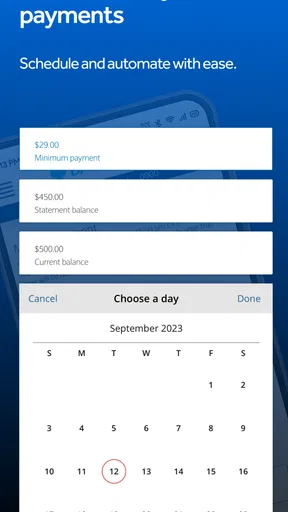
For a card payment, I’d check the balance and due date before choosing a payment approach. Automatic payments can reduce the chance of forgetting a bill, but they still deserve an occasional review: confirm that the linked payment arrangement remains appropriate and that the amount and timing fit your plans. A one-time payment gives more control when your monthly cash flow varies. Neither method is automatically better; the right choice depends on how predictable your finances are and how much attention you want to give each cycle.
Useful trade-offs before relying on it
Convenience and concentration go together here. Keeping account activity and card administration in one bank’s app can make common tasks quicker, but it also means the app’s usefulness depends on your relationship with Barclays. If you rarely use a Barclays account, a broader financial dashboard may earn a place on your home screen more easily. If you do use one, adding another general-purpose app may create duplicate checks rather than a clearer picture.
I’d also treat alerts and quick access as prompts to review, not as a substitute for careful account oversight. A transaction appearing quickly can help you notice unfamiliar activity sooner, but a notification alone does not explain a purchase or resolve a dispute. If something looks wrong, take time to inspect the details and use the appropriate support route instead of assuming that a fast update means the issue is settled. Likewise, locking a card is a useful response to a lost-card situation, but it does not remove the need to contact the issuer when you need help with what happened.
Worth Reading Before You Choose

EA SPORTS FC Mobile 26 Is a Bigger Football Game, but It Takes Time

Flipboard Shows What News Apps Must Do Beyond the Feed

Switching to Android Auto Means Rethinking Your Driving Routine

Google Calendar Makes a Crowded Week Easier to Manage

Ludo King Makes the Most of the Minutes Between Plans

Baby Panda World Brings Quick Play to Modern Phones, but Its Game Library Feels Busy
Questions worth settling before making it your daily tool
Will it fit the phone you use? The app’s minimum operating-system requirement is version 12, so I’d check compatibility before planning to rely on it. Is it expensive to try? It is free, which makes a test run low-risk, though free access does not by itself mean that every financial need is covered. Is it broadly used? Its average rating is 4.6 from around 56,000 ratings, and it has over a million installs; those figures suggest an established audience, but they cannot guarantee that every person’s experience will be smooth.
It is also reasonable to ask whether the app is suitable for a younger user. Its content rating is Everyone, but that label is not a substitute for adult guidance around real banking accounts, payment decisions, or protecting login details. For anyone managing an account, I’d keep device access private, use the available sign-in protections, and make sure the person using the app understands that a balance check is only one part of staying on top of money.
What its version history can and cannot tell you
The app was released on February 16, 2012, and its current version is 8.6.6. That long span and the current version show that the product has continued through multiple iterations, but they do not reveal which individual functions changed or how a particular screen has evolved. I would not assume that an older review describes the current interface exactly; app layouts and workflows can change over time, so the most useful test is to install the current release and try the tasks you personally depend on.
For existing users, a version change is most important when it affects a familiar routine: signing in, finding recent activity, making a payment, or reaching help. After an update, I’d take a moment to confirm that the key controls are where I expect them and that any saved payment setup still matches my intentions. That is a sensible habit for financial software generally, without treating every new version as a warning or assuming that a version number guarantees a particular improvement.
First Impressions
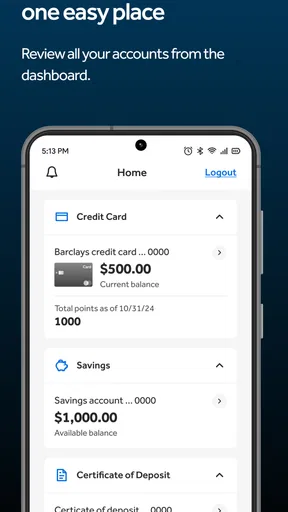
So, I downloaded the Barclays US app, and honestly, the first thing that struck me was the clean and intuitive interface. No clutter, no unnecessary frills. Just a sleek design that makes navigation a breeze. From the home screen, you can easily access your account information, transactions, and rewards, all with just a few taps. It's pretty impressive how they manage to pack so much functionality into such a user-friendly layout.
Features That Stand Out
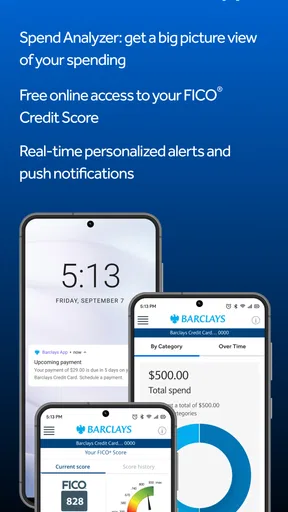
One of the standout features is the app's real-time transaction updates. You know how sometimes you swipe your card and then anxiously wait for the transaction to show up? Not here. The app updates your transactions almost instantly, so you're always in the loop about your spending. It's a small detail, but trust me, it makes a big difference.
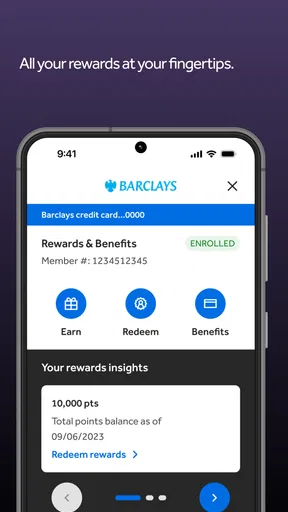
Another feature worth mentioning is the rewards tracking. If you're like me and love to see those points rack up, you’ll appreciate how the app lets you keep an eye on your rewards balance. You can even redeem points directly from the app, whether you're looking to snag a gift card or book a flight.
Security and Peace of Mind
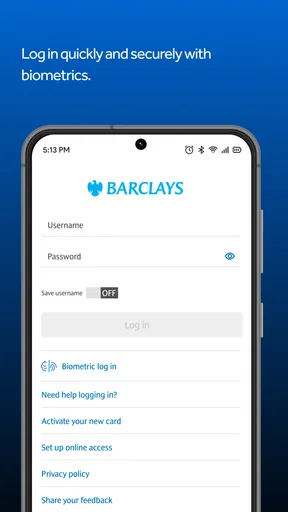
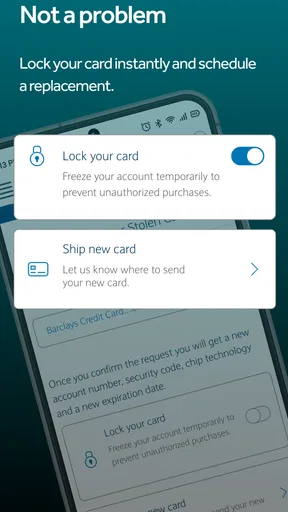
Now, let's talk security. Obviously, when we're dealing with financial information, security is a top priority. The app uses advanced encryption technology to keep your data safe, and you can enable biometric login for that extra layer of security. Plus, if your card ever gets lost or stolen, you can lock it instantly through the app—total lifesaver.
For me, the useful security workflow is having a response ready before I need one. If I misplace a card while travelling or after a busy day, being able to lock it from the app can be quicker than searching for a phone number first. I’d still make sure I know how to contact support, because locking a card handles an immediate access concern; it is not a replacement for getting help with a suspicious transaction or a lost-card report. Biometric sign-in can also make frequent checks less tedious, provided I’m using a device I control and keep protected.
Managing Payments Made Easy
Paying your credit card bill has never been easier. The app lets you set up automatic payments, so you never miss a due date. You can also make one-time payments if that's more your style. The payment process is straightforward, and the app even gives you a handy breakdown of your balance, minimum payment, and payment due date. No more guessing games.
That information is most helpful when I use it to make a deliberate choice rather than simply paying the smallest amount shown. Before confirming a payment, I’d compare the due date and balance with what I can comfortably pay, then decide whether a recurring arrangement or a manual payment suits that month. If I’m managing a tight schedule, an automatic payment can reduce the risk of forgetting; if my available funds change from week to week, a manual check may offer better control. The app makes the task easier, but the decision still belongs to me.
Customer Support at Your Fingertips
Another nice touch is the app's direct line to customer support. Whether you prefer to chat or call, help is available right from the app. I've had to reach out a couple of times, and each experience was smooth and efficient. It’s comforting to know that support is just a tap away when you need it.
Having support within the same app is particularly handy when a question comes up while reviewing an account, since I can move from checking the issue to looking for help without switching contexts. For urgent concerns, I’d use the quickest available contact route rather than spending time searching through menus. For a less urgent question, having chat as an option can be a comfortable way to explain the situation. Either way, convenient access is valuable, but it does not mean every issue will be resolved instantly.
Wrapping It Up
In conclusion, the Barclays US app is an impressive all-rounder in the realm of financial management apps. It combines a user-friendly design with robust features and top-notch security. Whether you're managing multiple accounts or just want a hassle-free way to pay your bills, this app has got you covered. If you're in the market for a reliable financial app, give this one a shot. It just might become your go-to tool for all things money-related.
Ready to give it a try? You can download the Barclays US app from the Google Play Store or the Apple App Store and start taking control of your finances today.
Pros
- User-friendly interface for easy navigation.
- Comprehensive account management features.
- Customizable alerts for transactions.
- Secure login with biometric options.
- Efficient payment and transfer options.
Cons
- Limited customer service availability.
- Occasional login issues reported.
- Some features require strong internet.
- No support for international transfers.
- App updates can be infrequent.
FAQs for Barclays US
What features does the Barclays US app offer?
The Barclays US app provides a range of features, including the ability to view account balances, track transactions, and manage your credit card payments. Users can also set up alerts for due dates and spending limits, access their FICO® Score, and enjoy secure messaging with customer service. The app aims to deliver a comprehensive banking experience on your mobile device.
Is the Barclays US app secure for mobile banking?
Yes, the Barclays US app employs multiple layers of security to protect user data. Features include encryption, biometric login options like fingerprint and facial recognition, and secure messaging. Additionally, users are encouraged to regularly update the app and use strong, unique passwords to enhance security further.
Can I manage multiple accounts with the Barclays US app?
Yes, the app allows you to manage multiple Barclays accounts from a single interface. You can easily switch between accounts to view balances, pay bills, and track transactions. This feature is designed to provide a seamless experience for users with various financial products with Barclays.
How user-friendly is the Barclays US app?
The Barclays US app is designed with user-friendliness in mind, featuring an intuitive interface that simplifies navigation. Users will find it easy to access key functions such as viewing statements, making payments, and setting up alerts. The app also includes helpful tutorials and a comprehensive FAQ section to assist new users.
Is there a cost to download and use the Barclays US app?
The Barclays US app is free to download and use for all account holders. While there are no fees associated with the app itself, users should be aware that standard data rates from their mobile carrier may apply. It's advisable to check with your service provider for any potential charges.


